Bluebeam 21 - Open with

Object: Set Bluebeam Revu 21 as the Default PDF Application
Description
This guide explains how to configure Windows to always open PDF files using Bluebeam Revu 21.
Steps
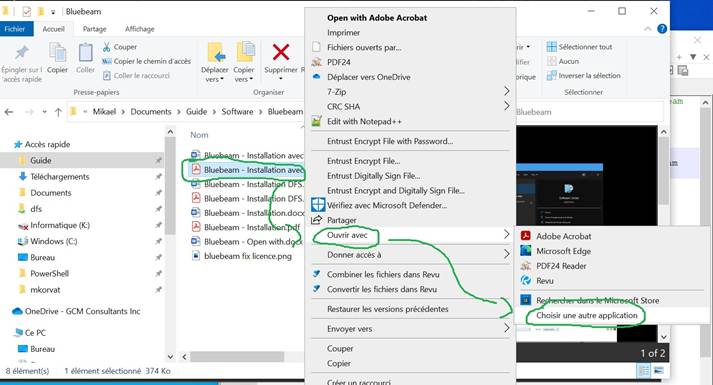
- Right-click on a PDF file, select
Open with, and then clickChoose another application.
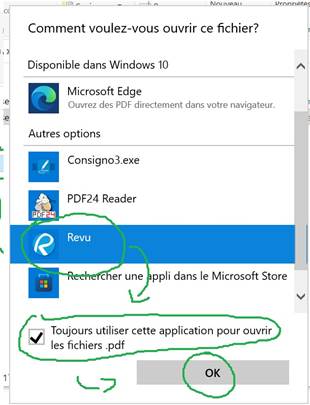
- Click on
Revuin the list of programs. - Check the box
Always use this application to open .pdf files. - Click
OK.
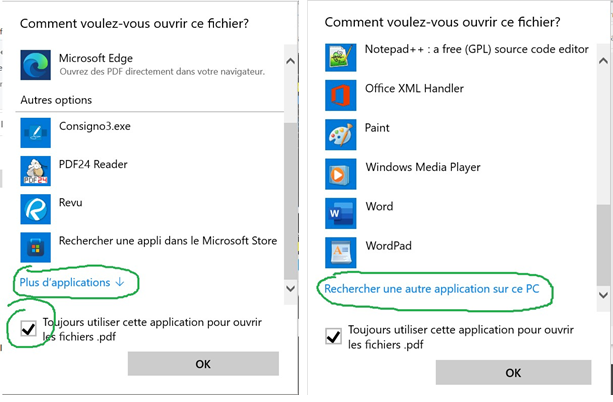
- If
Revuis not in the list, check the boxAlways use this application to open .pdf files. - Scroll down and click
More applications. - At the bottom of the menu, click
Search for another application on this PC.
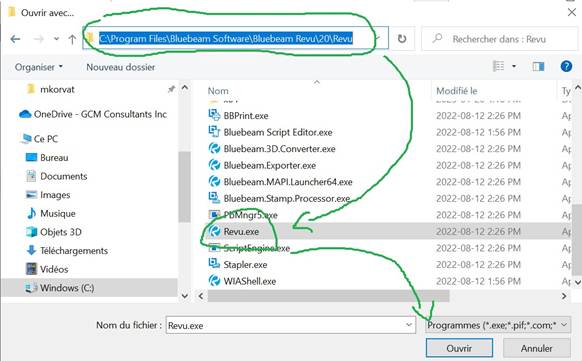
- Copy the following path:
C:\Program Files\Bluebeam Software\Bluebeam Revu\21\Revu - Paste the path into the address bar of the window that opens and press
Enter. - Click on the
Revuapplication. - Click
Open.